
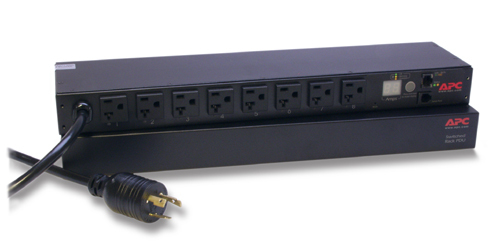
Switched, , 2400VA, 20A, 120V, 50/60 Hz, 8x NEMA 5-20R, NEMA L5-20P, 445 x 108 x 44 mm, 2270 g
£822.79 Ex. VAT
In Stock: Delivery schedule confirmed upon order processing.
APC AP7901B. PDU types: Switched, Rack capacity: , Product colour: . AC outlets quantity: 8 AC outlet(s), AC outlet types: NEMA 5–20R, Input connection type: NEMA L5-20P. Cable length: 3.66 m, Certification: cUL, CSA, FCC 15 A, ICES-003, UL 60950, UL. Monitoring: Current, Outlet control: Recycle, Turn off. Nominal input voltage: 120 V, Maximum current: 20 A, AC input frequency: 50 – 60 Hz
Availability
Network Management Capabilities
Full-featured network management interfaces that provide standards-based management via Web, SNMP, and Telnet. Allows users to access, configure, and manage rack PDUs from remote locations to save valuable time. Associated with this feature is the ability to quickly and easily upgrade the firmware via network download to installed units for future product enhancements.
Remote Individual Outlet Control
Remotely manage outlets so users can turn outlets off that are not in use (prevent overloads) or recycle power to locked-up equipment (minimize costly downtime and avoid travel time to equipment).
Alarm Thresholds
Define alarm thresholds in order to avoid overloaded circuits. Network and visual alarms inform the user of possible problems. (Note: Only available on units with the current monitoring capabilities. Please see SKU specifications for availability)
Local Current Monitoring Display
The aggregate current draw per rack PDU is displayed on the unit via a digital display. The local digital display helps installers avoid overloaded circuits by providing a visible warning when the current draw is close to the maximum amperage draw of the strip. (Available on designated SKUs only)
Power Delays
Allows users to configure the sequence in which power is turned on or off for each outlet. This helps avoid in-rushes at start-up, which can cause overloaded circuits and dropped loads. Sequencing also allows users to predetermine which piece of equipment is turned on first so other equipment dependant on that unit will function properly.
Load indicator LED
Indicates overload and warning conditions based on the user-defined alarm thresholds. Alerts users of potential overloaded circuits.
Flash Upgradeable
Quickly and easily upgrade firmware via network download for future product enhancements. Eliminates the need to replace products already installed in the field when new features are released. (Note: Networked units only)
Integrates with StruxureWare Data Center Expert
An IT-ready, scalable access monitoring system that collects, organizes, and distributes critical alerts, surveillance video and key information, providing a unified view of complex physical infrastructure environments from anywhere on the network
Marketing Features
Remote Individual Outlet Control
Remotely manage outlets so users can turn outlets off that are not in use (prevent overloads) or recycle power to locked-up equipment (minimize costly downtime and avoid travel time to equipment).
Remote Management Capabilities
Full-featured network management interfaces that provide standards-based management via Web, SNMP, and Telnet. Allows users to access, configure, and manage units from remote locations to save valuable time. Associated with this feature is the ability to quickly and easily upgrade the firmware via network download to installed units for future product enhancements.
Alarm Thresholds
Define alarm thresholds in order to avoid overloaded circuits. Network and visual alarms inform the user of possible problems.
Power Delays
Allows users to configure the sequence in which power is turned on or off for each outlet. This helps avoid in-rushes at start-up, which can cause overloaded circuits and dropped loads. Sequencing also allows users to predetermine which piece of equipment is turned on first so other equipment dependant on that unit will function properly.
Local Current Monitoring Display
The aggregate current draw per power distribution unit is displayed on the unit via a digital display. The local digital display helps installers avoid overloaded circuits by providing a visible warning when the current draw is close to the maximum amperage draw of the strip.
Agility
Single input power source
Supply power from one branch whip to multiple pieces of equipment, conveniently powering rack-mount equipment. Saves time and money during installation by using one branch whip and standard connections.
Rack-Mountable
Includes horizontal, vertical, and toolless-mount varieties. Puts power where it is needed most – in the racks near the equipment.
Wide range of input and output connections
Product family includes a variety of input and output connections to distribute 120V, 208V, or 230V power to multiple outlets. Having a variety of inputs and outputs allow users to adapt to varying power requirements. APC offers units that bring up to 14.4kW using a single branch whip.
Full specifications for this model are listed below.
| Input connection type | NEMA L5-20P |
|---|---|
| Certification | cUL, CSA, FCC 15 A, ICES-003, UL 60950, UL |
| Maximum input current per phase | 20 A |
| Nominal input voltage | 120 V |
| Maximum total current draw per phase | 16 A |
| Maximum current | 20 A |
| Cable length | 3.66 m |
| Load capacity | 2400 VA |
| Product colour | Black |
| Package weight | 3.45 kg |
| Package dimensions (WxDxH) | 470 x 343 x 70 mm |
| Dimensions (WxDxH) | 445 x 108 x 44 mm |
| Weight | 2.27 kg |
| Nominal output voltage | 120 V |
| Operating temperature (T-T) | 0 – 45 °C |
| Operating relative humidity (H-H) | 0 – 95% |
| Storage temperature (T-T) | -25 – 65 °C |
| Storage relative humidity (H-H) | 0 – 95% |
| PDU types | Switched |
| Monitoring | Current |
| Outlet control | Recycle, Turn off |
| Operating altitude | 0 – 3000 m |
| Non-operating altitude | 0 – 15000 m |
| AC outlet types | NEMA 5–20R |
| Rack capacity | 1U |
| AC input frequency | 50 – 60 Hz |
| Sustainability certificates | RoHS |
Our specialists are here to help assess compatibility, compare suitable alternatives, or talk through your configuration needs before committing to a solution.
Contact us today for a no-obligation chat.
Below you’ll find alternative models, suitable software and services that pair with this solution – helping you to avoid compatibility issues, reduce support overhead and deploy with confidence.
Not all deployments fit standard configurations. If you’re weighing up options or want a second opinion on your setup, our team is here to help with honest, straightforward advice backed by decades of vendor knowledge.


Not sure which model is right for your environment? Our specialists can help you select the right platform for your infrastructure requirements.