Server Health Check Guide

This guide explains how a server health check helps identify faults, remediation priorities and the overall condition of business-critical server infrastructure before small issues become service-impacting problems.

What is a Server Health Check?

A Server Health Check is a focused technical review of server condition, configuration and performance. It examines CPU and memory behaviour, storage, hardware sensors, alerts, firmware, logs, power, thermal conditions, redundancy and other indicators that may affect reliability or workload performance.

Who it’s for

Organisations running physical servers for critical applications, databases, virtualisation hosts, infrastructure services or specialist workloads, especially where concerns have emerged around reliability or performance.

Common use cases

Virtualisation hosts Physical hosts running multiple production VMs and clustered workloads
Database servers Servers supporting transactional, analytical or data-platform workloads
Business application servers Physical systems running ERP, middleware, line-of-business or infrastructure applications
GPU & accelerated servers High-power systems containing GPUs or specialist accelerators
Edge & branch servers Servers operating in remote offices, factories, stores or distributed locations
High-availability clusters Clustered servers supporting services where host failure must not interrupt operations

Why Organisations Perform Server Health Checks

Identify reliability, performance and capacity issues early so server risks can be addressed before they disrupt operations.

Identify Hardware Issues

Detect faults and early signs of degradation before they compromise server reliability and disrupt supported workloads.

Find Performance Bottlenecks

Understand whether CPU, memory, storage or system constraints are limiting workload performance on the server.

Validate Configuration

Confirm firmware, drivers, settings and redundancy are consistent and appropriate for reliable day-to-day operation.

Reduce Unplanned Downtime

Address developing faults and weak points before they turn into service-impacting failures and operational interruption.

Identify Capacity Constraints

Check whether compute, memory and local storage headroom are sufficient for current workload demands.

Plan Hardware Refreshes

Use health, lifecycle and performance evidence to prioritise replacement or decide where reuse remains appropriate.

Common Server Hardware Challenges

Server health checks can identify hardware, performance and support issues that may affect stability, availability and workload behaviour.

Component Failures

Disk, memory, power supply, fan or controller errors can indicate faults that threaten server stability and availability.

CPU & Memory Bottlenecks

Sustained processor demand, memory pressure, swapping or NUMA imbalance can reduce application performance and limit peak workload headroom.

Storage Performance Issues

High disk latency, controller contention, degraded RAID groups or failing drives can slow storage for applications and databases.

Firmware & Driver Inconsistency

Outdated or mismatched firmware, BIOS and drivers can cause compatibility problems, instability, security exposure and inconsistent server behaviour.

Thermal & Power Issues

High temperatures, fan problems, abnormal power readings or poor airflow can affect component health and trigger throttling.

Ageing Hardware

Servers nearing end of life or outside vendor support may have limited parts, firmware updates and newer compatibility.

Server Health Check

What We Assess

We assess six key areas across the server and supporting infrastructure that affect reliability, performance and resilience.

Our Assessment Scope

These core areas help us evaluate whether the server is operating within expected limits and whether surrounding infrastructure is contributing to issues.

01

Compute & Hardware

  • CPU and memory health
  • Hardware alerts, sensors and utilisation
  • Component fault history
02

Storage & I/O

  • Disk and controller condition
  • RAID, volume and capacity health
  • Storage latency, throughput and I/O errors
03

Networking

  • NIC health and utilisation
  • Link errors and connectivity
  • Network redundancy and traffic constraints
04

Power & Cooling

  • Power-supply health and power draw
  • Temperature and fan behaviour
  • Rack airflow and thermal stress
05

Firmware & Configuration

  • BIOS and firmware versions
  • Driver consistency
  • Controller and management configuration
06

Resilience & Lifecycle

  • Power and storage redundancy
  • Cluster or host failover
  • Warranty, support and hardware age
Assessment Outcome

The health check identifies developing hardware faults, infrastructure dependencies and lifecycle risks so remediation or replacement can be planned before service is affected.

Server Health Check: Assessment Approaches

Choose the approach based on whether the priority is faults, performance, consistency or lifecycle risk.

01
Approach

Diagnostic Server Health Check

Best suited to

Servers showing hardware alerts, instability, reboots or suspected physical faults.

Advantages
  • Identifies immediate failures or degradation
  • Reviews logs, alerts and diagnostics
Considerations

Intermittent issues may not appear during a point-in-time check.

02
Approach

Performance Health Check

Best suited to

Operational servers with slow workloads, saturation, latency or inconsistent performance.

Advantages
  • Distinguishes bottlenecks from hardware issues
  • Identifies tuning or capacity actions
Considerations

Measurements should include representative peaks.

03
Approach

Configuration Health Check

Best suited to

Server estates with inconsistent firmware, drivers, BIOS settings or hardware configurations.

Advantages
  • Identifies configuration drift and compatibility risks
  • Supports a repeatable supported baseline
Considerations

Standardisation must respect workload-specific requirements.

04
Approach

Lifecycle Health Check

Best suited to

Organisations concerned about ageing servers, expired warranties or increased maintenance risk.

Advantages
  • Combines condition with lifecycle status
  • Prioritises refresh or migration planning
Considerations

Lifecycle status should be balanced against business criticality.

How Our Server Health Check Guide Works

The check follows a six-stage process, from scoping the issue through to findings, risks and a clear remediation plan.

Stage 01 Discovery & Scope

You tell us about known issues, recent incidents and any maintenance limits. We confirm whether the check is preventative or a response to a current problem, so the work stays focused on the right services and symptoms.

Assessment Checklist

Before the assessment begins, we will ask you to provide or arrange the server information, access and records needed for the review.

Server Inventory

Provide a list of servers in scope with model, asset or serial ID, location, role, age and criticality.

Hardware & Configuration Details

Supply current hardware specifications and configuration details, including CPU, memory, storage, RAID or controller settings, network adapters, operating system and firmware versions.

Management Interface Access

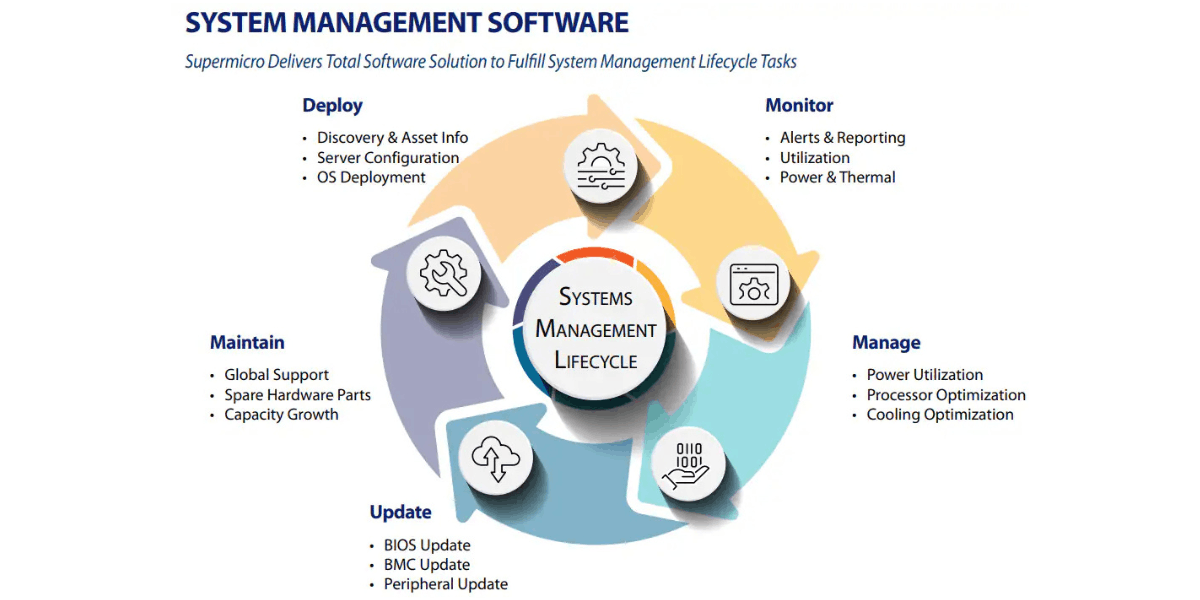
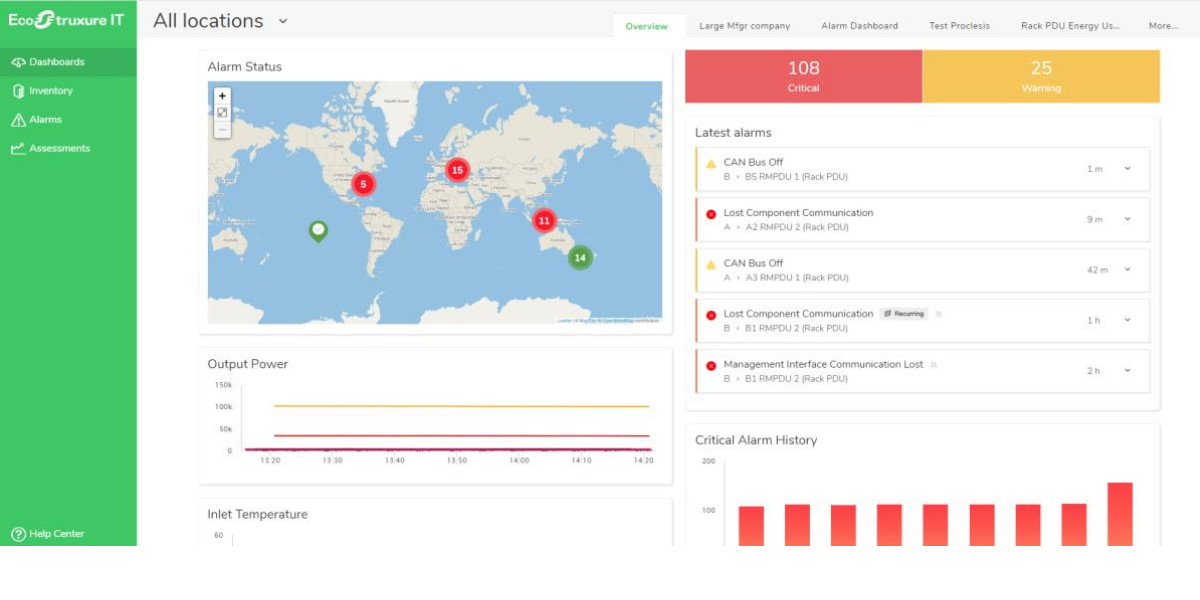
Arrange read-only access to server management interfaces or central hardware-management platforms for status, sensor, alert and log review.

Monitoring & Alert History

Share available monitoring history, alert logs, hardware warnings, incident records and recurring symptoms that may indicate intermittent or developing faults.

Performance Data

Provide recent and historical CPU, memory, storage, network and application performance data covering normal and peak operating periods where possible.

Maintenance & Support Records

Supply maintenance records, warranty or support status, prior component replacements, firmware update history and known end-of-support dates.

Our Server Assessment Best Practices

These principles guide how we assess server condition, operating margin, resilience and support status using evidence from the live environment.

Review Hardware Health First

We examine management telemetry, event logs and component status across disks, memory, power supplies, fans, controllers and other critical server hardware.

Analyse Performance Over Time

We review CPU, memory, storage and I/O behaviour across representative periods to spot deterioration, saturation or abnormal patterns a single snapshot may miss.

Check Firmware & Driver Consistency

We compare firmware and driver versions across similar servers and supported baselines to identify inconsistency, interoperability risk and configuration drift.

Measure Capacity Headroom

We calculate available CPU, memory, storage and I/O headroom against normal demand, peak periods, maintenance and failover scenarios.

Validate Resilience Evidence

We review redundancy, failover and recovery design and assess available evidence that power, storage, network and cluster resilience behave as intended.

Plan Before Support Ends

We assess hardware support status, age, condition and workload dependency so replacement or migration can be prioritised before support becomes critical.

Assessment Deliverables

Following the health check, you receive documented server findings, risk priorities and practical next steps based on the systems reviewed.

Assessment Output

Server Health Report

A technical report covering component condition, management telemetry, event logs, firmware and driver state, resource utilisation, resilience and other server health indicators.

Assessment Output

Performance & Capacity Findings

A clear analysis of CPU, memory, storage and I/O demand, highlighting saturation, abnormal utilisation, limited headroom and other capacity conditions affecting performance.

Assessment Output

Risk Register

A prioritised record of hardware faults, degraded components, support or lifecycle concerns, resilience weaknesses and other risks identified during the health check.

Assessment Output

Remediation Plan

A practical plan covering immediate corrective actions, monitoring changes, configuration updates, component replacement and any longer-term server refresh requirements.

Why Choose Steel City Consulting for Server Health Checks

We work with IT teams reviewing server estates across complex infrastructure environments. Our consultants assess performance, capacity, resilience and lifecycle risks to help establish the current state and define practical next steps.

  • Independent multi-vendor expertise Assess requirements across complex, multi-vendor infrastructure environments.
  • Decades of IT expertise Practical consultancy across architecture, deployment, optimisation and modernisation.
  • Assessment through implementation Move from findings into remediation, design and infrastructure deployment.

Server Health Check

Discuss Your Server Health Check

Tell us about your current server environment, the issues you want to assess and any planned changes or projects. We’ll discuss the scope of the health check and what you need it to establish.

From Assessment Findings to Action

Where the health check identifies gaps or improvement opportunities, Steel City Consulting can support the next stage, from remediation and infrastructure design through to implementation and ongoing optimisation.

Remediation & Optimisation

Address performance, capacity, resilience, configuration and lifecycle issues.

Architecture & Design

Turn findings into a practical target architecture and prioritised plan.

Technology & Implementation

Select, size and implement infrastructure required to address identified needs.

Ongoing Optimisation & Lifecycle

Validate improvements and support future capacity, lifecycle and modernisation needs.

Planning a server health check?

Speak to our consultants about your current environment, key concerns and what you need the health check to establish.

Speak to a specialist today

Related Technology Guides

Server health findings are closely tied to compute architecture, modernisation, lifecycle and maintenance; these guides help translate condition data into practical next steps.

Data Centre Architecture & Design Guide

Explore how compute, storage, networking, power and cooling are designed together to support resilient data-centre operations.

Read the guide

Compute Infrastructure Modernisation Guide

Explore how ageing or constrained server estates can be consolidated, refreshed and modernised around current workload and lifecycle requirements.

Read the guide

Technology Refresh Guide

Understand how lifecycle, support, performance, risk and business priorities are combined into a phased infrastructure refresh plan.

Read the guide

Extending the Life of IT Hardware Guide

See how condition, supportability, maintenance and workload fit can be used to decide when existing infrastructure can remain in service safely.

Read the guide

Server Health Check Guide FAQ

When should we arrange a server health check?

A server health check is useful when faults recur, performance changes, or you need evidence to decide whether ageing hardware can remain in service.

It can help before a refresh, after repeated alerts or when the cause of an outage risk is unclear. We assess server condition alongside workload and supporting infrastructure, so recommendations address operational need as well as hardware age.

Is a server problem caused by failing hardware or by the workload running on it?

We compare component health and hardware alerts with resource use and application behaviour to distinguish faults from workload or configuration pressure.

A slow server does not automatically mean a component has failed. We review evidence from the host and its supporting systems, then explain whether the issue points to hardware, capacity, configuration or an application that needs separate investigation.

Can you spot warning signs before a server fails?

We review event logs, component status and operating conditions for recurring alerts or changes that may indicate a developing server fault.

The assessment looks for patterns such as repeated hardware warnings, abnormal temperatures or power events. These findings cannot guarantee when a component will fail, but they can help your team prioritise checks and plan maintenance before a problem causes disruption.

Does the server have enough CPU, memory and I/O headroom?

We compare normal and peak CPU, memory and I/O use with workload demand, growth expectations and the headroom needed for resilience.

This shows whether the server has room for additional demand, is operating close to its limits or has capacity that could be used elsewhere. The result supports decisions about optimisation, upgrades, consolidation or replacement.

Could the network or storage be making the server look slow?

Yes, storage latency, network errors or limited bandwidth can slow applications even when server resources appear available, so we assess dependencies before recommending server upgrades.

We compare host utilisation with disk or SAN behaviour and network health, including latency and link use. This helps identify whether the server is waiting on another system and prevents an unnecessary CPU or memory upgrade.

Are power and cooling conditions putting the server at risk?

We check whether the server’s temperature and power conditions are contributing to throttling, instability or component risk, then identify which issue needs attention first.

The review considers available telemetry and the server’s operating environment, including recurring thermal or power alerts. If conditions appear to be affecting performance or reliability, we identify what facilities or infrastructure teams should investigate before replacing hardware.

Can the health check tell us whether to extend the server’s life or replace it?

Yes, we assess workload suitability, hardware condition, support status and capacity to recommend whether to retain, remediate or refresh the server.

The recommendation considers the risks and costs of keeping the system alongside the needs of the workload it supports. That gives IT a practical basis for planning maintenance or replacement, rather than relying on age alone.

Will the assessment disrupt live services, and what happens during it?

Most checks use management telemetry, logs and read-only configuration data, so the server can usually remain in production during the assessment.

We agree the required access and information with your team first. If a diagnostic is intrusive or could affect a live workload, we explain why it is needed and agree timing and safeguards before carrying it out.

What will we be able to decide once the assessment is complete?

You will have a clear view of server health, capacity, likely performance constraints and which maintenance or refresh actions should take priority.

We connect findings to the workloads and services the servers support, then explain the reasons for each recommendation. This helps your team plan remedial work, budget for refresh and identify systems that can safely remain in service.

Can Steel City Consulting help us act on the findings?

Yes, we can help plan and deliver the next step, from remediation and compatible replacement sourcing through implementation and ongoing lifecycle support.

We can work with your team to resolve identified issues or plan a phased server refresh, checking that selected systems fit your workloads and existing environment. Discuss your server plans with our team and we can look at the right next step.